

Exports & Module System

ScaffScript is a minimal superset of GML (GameMaker Language) that adds a TypeScript-like module system. Write organized, modular GML in .scaff files. ScaffScript compiles to GML and can inject it directly into your GameMaker project.
Exports & Module System
Code Generation & Integration
Write TypeScript-flavored GML, ship as an actual GML
Section titled “Write TypeScript-flavored GML, ship as an actual GML”
Don’t forget to leave a star on the GitHub repository! ⭐
GML is perfect for fast prototyping with its functional and event-driven nature. But, this paradigm may be limiting when your project grows. Yes, you can split your code into multiple script assets. But, it becomes verbose fast and pollutes your global-scoped code (functions, macros, enums). Like, creating function mylib_create(), function mylib_*, function and function over and over again. And it become the worst nightmare if you want to create “one-gigantic-library-in-one-script” that contains everything, moreover, if you want OOP approach with GML.
ScaffScript exists to fill that gap. It adds a module system to GML, so you can write organized, maintainable GML code. It’s designed to “free” you from the that verbose code, while still keeping the flexibility of GML. You can think of it as a “preprocessor” for GML. It’s not a full-blown language, it’s a minimal superset language to help you write better GML code, especially for creating GML libraries.
*.scaff and *.gml files.export / import / include references across files.intg statements to know which blocks go to which GameMaker asset..gml output.
noIntegration is false, ScaffScript writes and integrates it directly into your GameMaker project..out/ directory for you to review and integrate manually.That’s ScaffScript in a nutshell. It’s designed to be as simple and lightweight as possible, while still providing a powerful module system that you can use to organize your GML code. You’ll learn more about how to use it later in the Your First Script guide.
No AST
ScaffScript currently uses a regex-based parser for rapid development. It’s not very reliable for complex code structures. For example, it may not work well with nested code blocks, such as nested struct literals in @use directives. It may also not work well with other edge cases. We may change to AST-based parser in the future.
No test for GameMaker 1.x
ScaffScript is currently designed and tested only for GameMaker 2.3+. It may or may not work with GameMaker 1.x.
Let’s say, we’re going to create a library for handling CSV files easily called EzCSV.
With only using GML, your project structure in the GameMaker IDE may look like this:
All of them are script assets. That’s the simplest way to organize your code in GameMaker IDE. Of course, you can split them again into folders, but, it’s not very maintainable when your project grows, as all of the “modules” are actually just a global functions, enums, and macros.
With ScaffScript, your ScaffScript project structure may look like this:
You may notice that the structure is not much different with the GML approach. That’s correct, because the real difference is the “design” of the code itself. We’ll cover that in the next section.
We will only cover the general logic of some files/modules, not the actual implementation, so you can get the idea of how ScaffScript works.
function ezcsv_read(file_path) { var result = ""; // implementation... return result;}function ezcsv_parse_array(csv_string) { var result = []; // implementation... return result;}function ezcsv_generate_struct(data) { var result = ""; // implementation... return result;}function ezcsv_get(file_path) { var result; var csv_data = ezcsv_read("data.csv"); // implementation... return result;}The function “endpoint” of the library. It uses other functions to do it’s job.
As you can see, all of the functions are in the global scope. They are not “connected” to each other in any way. You can “connect” them by calling the functions directly, as shown in the scrEzCSVGet example. But, it may become painful to manage when your project grows.
export function read(file_path) { var result = ""; // implementation... return result;}export function parse_array(csv_string) { var result = []; // implementation... return result;}export function generate_struct(data) { var result = ""; // implementation... return result;}intg { main } to "./scripts/Libraries/EzCSV"
import * from "./parse"
#[main]include { read } from "./file-system"include { generate_struct } from "./generate"@content parse_array
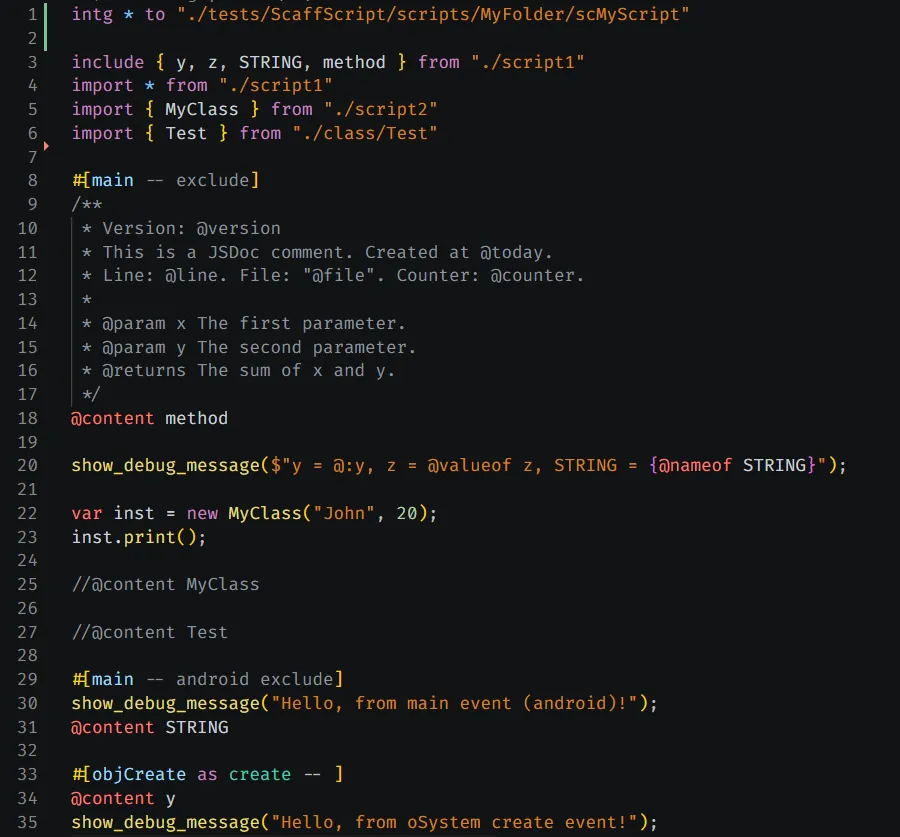
function ezcsv_get(file_path) { var result; var csv_data = read(file_path); // implementation... return result;}As you can see, we’re using export keyword to export the functions from each module. Then, in the src/index.scaff, we’re using import and include statement to import and inline the exported functions from other modules. The ezcsv_get function is the “endpoint” of the library. It uses other functions to do it’s job.
Yes, what you see is correct! ScaffScript code is longer and more complex than the GML code. It makes sense, because we’re using ScaffScript’s module system to connect the exports from different modules (in this case, functions).
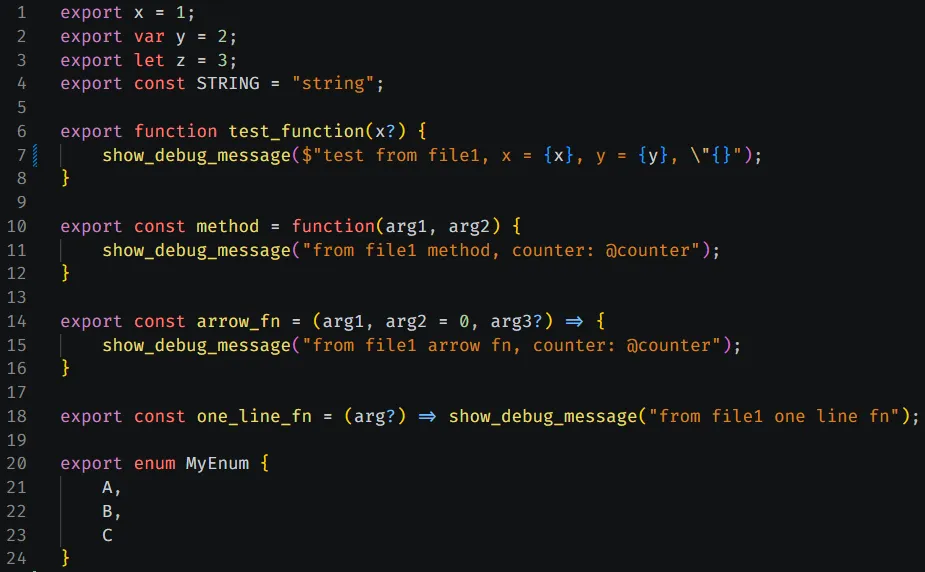
Each export can be used by other modules using import and include statement. So, you have more control over your code organization, such as:
You don’t need to “throwing” everything into the global scope anymore. It’s like an overkill for a simple library like this, but it’s worth it in the long run.
| Extension | Description |
|---|---|
.scaff | ScaffScript source, supports the full module system |
.gml | Standard GML, can be included as raw content via include |
If you have any questions or feedback, feel free to join the Discord server or open an issue on the GitHub repository.
ScaffScript is licensed under the MIT License.
Contributions are welcome! Please see the Contributing guide for more information.
If ScaffScript is useful to you, please consider sponsoring or supporting this project through Ko-Fi or Trakteer. Your support helps keep the project alive and thriving!